JTSarmiento
HOW TO CHANGE PASSWORD
See the format below on how to change your password, whether your a new retailer/dealer or an old retailer/dealer.


CHANGEPW 123456 021793

HOW TO CHANGE PASSWORD USING YOUR CELLPHONE
Using your cellphone go to WRITE MESSAGE and follow the format below:
CHANGEPW<SPACE>OLD PASSWORD<SPACE>NEW PASSWORD
(NEW PASSWORD SHOULD BE 6-8 DIGITS)
Example:
CHANGEPW<SPACE>123456<SPACE>021793
SEND TO ACCESS NUMBER:
0928 686 3078
Access number will depend on the last digit of your cellphone number.


HOW TO CHANGE YOUR WEBTOOL PASSWORD
STEP 1
Log on to 1BROGLOBAL.COM
STEP 2
On the top right corner choose LOGIN AS A MEMBER
STEP 3
Choose LOADCENTRAL LOGIN
STEP 4
Log in using your retailer number and current password.
STEP 5
choose CHANGE PASSWORD
STEP 6
All you have to do is enter your:
-Cellphone password/FL or sms password
-Current Webtool Password
-New Webtool Password
-then press CHANGE PASSWORD
 STEP 1 & 2 |  STEP 3 |  STEP 4 |
|---|---|---|
 STEP 5 | 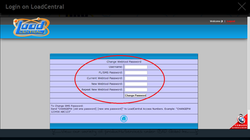 STEP 6 |
